有时候下载的文件/文件夹会带有广告后缀,通过Java实现批量去除
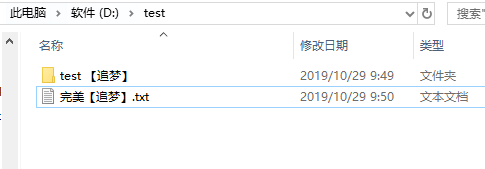
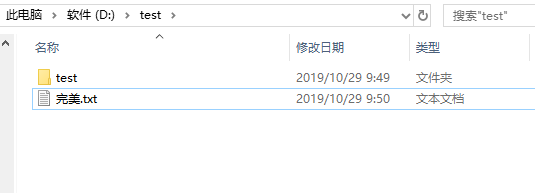
实现效果
Before
After
代码
1
2
3
4
5
6
7
8
9
10
11
12
13
14
15
16
17
18
19
20
21
22
23
24
25
26
27
28
29
30
31
32
33
34
35
36
37
38
39
40
41
42
43
44
45
46
47
48
49
50
51
52
| package com.we;
import java.io.File;
public class ClearAdvert {
public static final String AD = "要去除的字符";
public static int fileNum = 0;
public static void main(String[] args) {
String rootPath = "指定的文件(夹)路径";
scanFile(rootPath);
System.out.println("共去广告" + fileNum + "个文件");
}
public static void scanFile(String path) {
File dirFile = reName(new File(path));
System.out.println(dirFile.getAbsolutePath());
if (dirFile.isDirectory()){
String[] fileList = dirFile.list();
for (int i = 0; i < fileList.length; i++) {
path = dirFile.getAbsolutePath() + "\\" + fileList[i];
scanFile(path);
}
}
}
public static File reName(File oldFile) {
String originalName = oldFile.getName();
if (originalName.contains(AD)) {
String oldFilePath = oldFile.getAbsolutePath();
String newFilePath = oldFilePath.replace(AD, "");
File newFile = new File(newFilePath);
if (oldFile.renameTo(newFile)) {
fileNum++;
return newFile;
}
}
return oldFile;
}
}
|
参考
https://blog.csdn.net/qq_41616414/article/details/102793368
(增加macOS路径写法)