ELCT 5830 Network and Web Programming 05

  • DOM
  • Event Propagation
  • Event Delegation
  • class, this, Function.bind()

DOM

文档对象模型Document Object Model,缩写DOM),是W3C组织推荐的处理可扩展置标语言的标准编程接口。

The “document” object

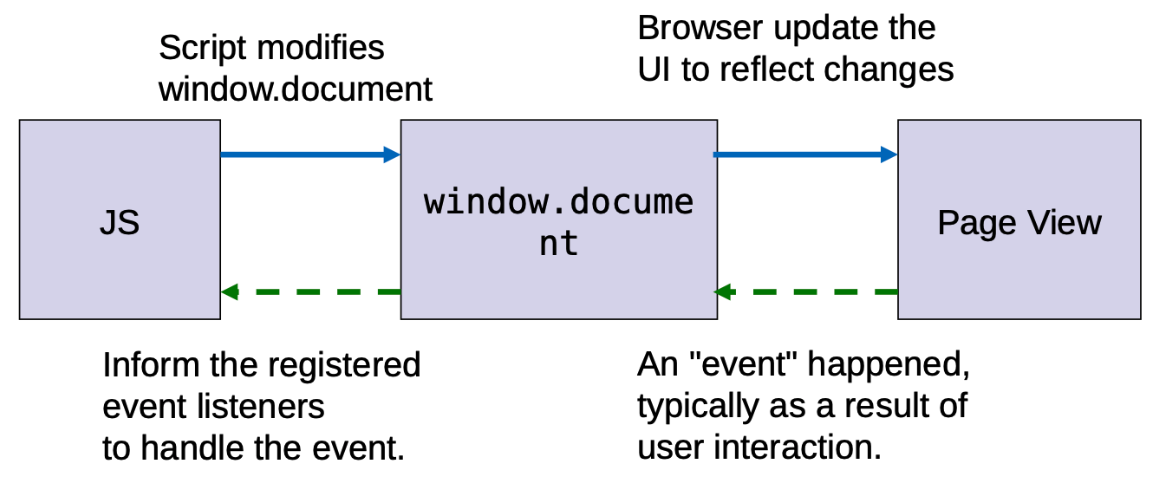
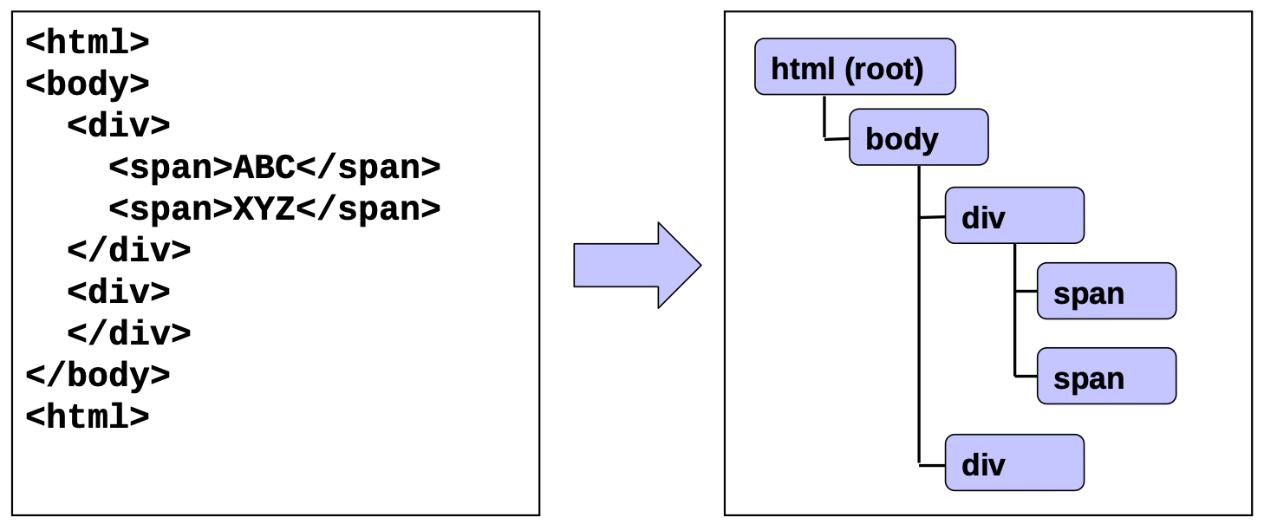
  • 浏览器从 HTML 文档在内存中构建树形数据结构
  • 该树通过 window.document暴露出来
  • window.document充当浏览器客户区中显示的视图的内存表现形式

通过window.document我们可以

  • 访问和操作文档树
  • 获取与文档相关的有用数据
    • cookies
    • 文档 URL
    • 最后修改日期

DOM 操作

检索元素

document.querySelector()

返回与指定 CSS 选择器匹配的第一个元素,如果未找到匹配项,则返回 null。

1
2
<span class=foo>ABC</span>
<span class=foo>XYZ</span>
1
2
3
let node = document.querySelector('.foo')
if (node != null)
console.log(node.textContent) // Output ABC

document.querySelectorAll()

返回一个静态(非实时) NodeList,其中包括与指定 CSS 选择器匹配的元素。

NodeList 对象是节点的集合,通常是由属性,如Node.childNodes 和 方法,如document.querySelectorAll 返回的。

NodeList 不是一个数组,是一个类似数组的对象(Like Array Object)。虽然 NodeList 不是一个数组,但是可以使用 forEach() 来迭代。你还可以使用 Array.from() 将其转换为数组。

1
2
<span class=foo>ABC</span>
<span class=foo>XYZ</span>
1
2
3
4
5
6
let nodes = document.querySelectorAll('.foo')
for (let i = 0; i < nodes.length; i++)
console.log(nodes[i].text)
// OR
for (let node of nodes)
console.log(node.text)

从子树中检索元素

假设我们要检索所有 “div” 元素和 #container 中包含的第一个 “a” 元素

1
2
3
4
5
6
7
8
9
10
// 方法1:搜索整个树两次
let allDivs = document.querySelectorAll('#container div')
let firstAnchor = document.querySelector('#container a')

// 方法2:避免搜索整个树两次
// 首先定位 #container
let node = document.querySelector('#container')
// 在 #container 下搜索子树
let allDivs = node.querySelectorAll('div')
let firstAnchor = node.querySelector('a')

Other

本文未包括的内容

  • 遍历文档树
  • 检索注释
  • 在文档对象中其他检索元素的方法
    • getElementById()
    • getElementsByTagName()

操作元素

例如 HTML content, text content, attributes, value, CSS style

HTML content

1
2
3
<div id="foo">
...
</div>
1
2
3
4
// Get
let htmlStr = document.querySelector('#foo').innerHTML
// Set
document.querySelector('#foo').innerHTML = htmlStr
  • 分配给.innerHTML的值会被解析,如果该值包含 HTML 标记,则创建相应的树节点

Text content

1
2
3
4
<div id="foo">
<b>ABC</b>
<i>XYZ</i>
</div>
1
2
3
4
5
6
7
8
// Get
let textStr = document.querySelector('#foo').textContent
// textStr is "ABC XYZ"
// 仅返回 HTML 内容的文本部分,即没有标签内容
// Set
document.querySelector('#foo').textContent = textStr
// textStr 中的所有特殊字符(例如 <, >, &)将被编码,以便 textStr中每个字符都会出现

Attributes

1
<a id="foo" href="...">...</a>
1
2
3
4
5
6
7
8
9
10
11
// Get
let ele = document.querySelector('#foo')
let attrValue = ele.getAttribute('href')

// Set
let ele = document.querySelector('#foo')
ele.setAttribute('href', attrValue)

// Remove
let ele = document.querySelector('#foo')
ele.removeAttribute('href')

Value of Form Elements

1
<input id="foo" value="...">
1
2
3
4
5
6
// Get
let value = document.querySelector('#foo').value
// Property value 是一个 string

// Set
document.querySelector('#foo').value = newValue

Checkbox States

1
<input id="foo" type=checkbox value="...">
1
2
3
4
5
6
7
// Get
let isChecked = document.querySelector('#foo').checked
// checked 是一个 boolean 类型的值

// Set
document.querySelector('#foo').checked = true // checked
document.querySelector('#foo').checked = false // unchecked

Style

  • window.getComputedStyle()
    • 返回一个只读对象,该对象表示应用于元素的最终样式
  • element.style
    • 该对象表示内联样式
    • 应该用于设置元素的样式,或检查通过 JavaScript 操作直接添加的样式

获取与设置 Styles

1
2
3
<div id=foo style="width:100%">
ABC
</div>
1
2
3
4
5
6
7
8
9
10
11
12
13
14
15
let foo = document.querySelector('#foo')

let computed = window.getComputedStyle(foo)
let inline = foo.style

// computed.width 是 "800px" (即,实际的宽度值)
// inline.width 是 "100%"
// inline.height 是 ""(因为这个 inline 的 style 没有设置)

// 为一个元素设置 styles
foo.style.color = "red"
foo.style.border = "blue solid 1px"
// 如果一个 style 名字有连字符号(例如,font-size)
// 使用数组语法(foo.style['font-size']
// 或用驼峰表示法(foo.style.fontSize)

用 class 来表示样式

1
2
3
4
5
6
7
8
9
10
11
12
13
// 我们可以通过增加或移除 classes 来改变样式
let foo = document.querySelector('#foo')

foo.classList.add("big")
foo.classList.remove("big")

// 如果 class "big" 已经被设置,那么就移除它,否则就增加它
foo.classList.toggle("big")

// 如果 class "big" 已经被设置
if (foo.classList.contains("big")) {
...
}

附加或插入内容

1
2
3
4
5
<div id="foo">
<span>Blah</span>
</div>
// 插入到上面
<a href="http://www.example.com">Example</a>
1
2
3
4
5
6
7
8
// 创建 “a" 元素
let newEle = document.createElement('a')
newEle.textContent = 'Example'
newEle.setAttribute('href', 'http://www.example.com')

// 将元素附加到 #foo 作为最后一个子节点
let foo = document.querySelector('#foo')
foo.appendChild(newEle)
  • 使用element.insertBefore()将元素插入到最后一个位置以外的任何位置

另一种附加/插入/替换内容方式

1
2
3
4
// 更新整个内容
let foo = document.querySelector('#foo')
foo.innerHTML = foo.innerHTML +
'<a href="http://www.example.com">Example</a>'
  • 这个方法涉及更新.innerHTML属性
  • 需要将内容构造为 HTML 字符串
  • 更少的代码
  • 依靠内置的解析器将 HTML 字符串转换为 DOM 对象(性能降低)

事件处理

支持机制

当 事件X 发生时,调用 函数Y

事件X:

  • 鼠标点击按钮
  • 键入输入文本框
  • 一个异步操作(如文件下载)完成

函数Y:

  • 事件处理
  • 事件监听
  • 回调函数

概述

1
function myHandler (event) { ... }

创建函数为事件处理提供服务,有关事件的信息将作为第一个参数传递给事件处理程序。

1
2
let ele = document.querySelector('#foo')
ele.onclick = myHandler

注册事件处理程序以监听目标上所需事件

常见事件

  • Focus: focus, blur
  • form: reset, submit, change
  • view: resize, scroll
  • keyboard: keydown, keypress.keyup
  • mouse: click, dblclick, mouseenter, mouseout, …
  • progress: load
  • value change: input

注册事件处理

1
2
3
// 方法1
let ele = document.querySelector('#foo')
ele.onxxx = myHandler
  • 将事件处理程序分配给目标节点 onxxx,onxxx 是节点名称,例如 click, focus
  • 属性 onxxx 最多可以容纳一个事件处理程序
1
2
3
4
// 方法2
<div id=foo onxxx="myHander(event)">
...
</div>
  • 在目标元素的 HTML 标签内,通过属性 onxxx 指定事件处理程序

分配给属性 onxxx 的值以以下方式附加到相应树节点的属性 onxxx 上

1
2
3
4
// Let "ele" represents the corresponding tree node
ele.onxxx = function (event) {
myHandler(event) // Value of the attribute
}

评论